Page 4 of 6 FirstFirst ... 23456 LastLast
Results 31 to 40 of 58
  1. #31

    Default

    UPDATE!

    Pardon to all Intel/NVDIA fanbois, guess I spoke too soon and moved too fast

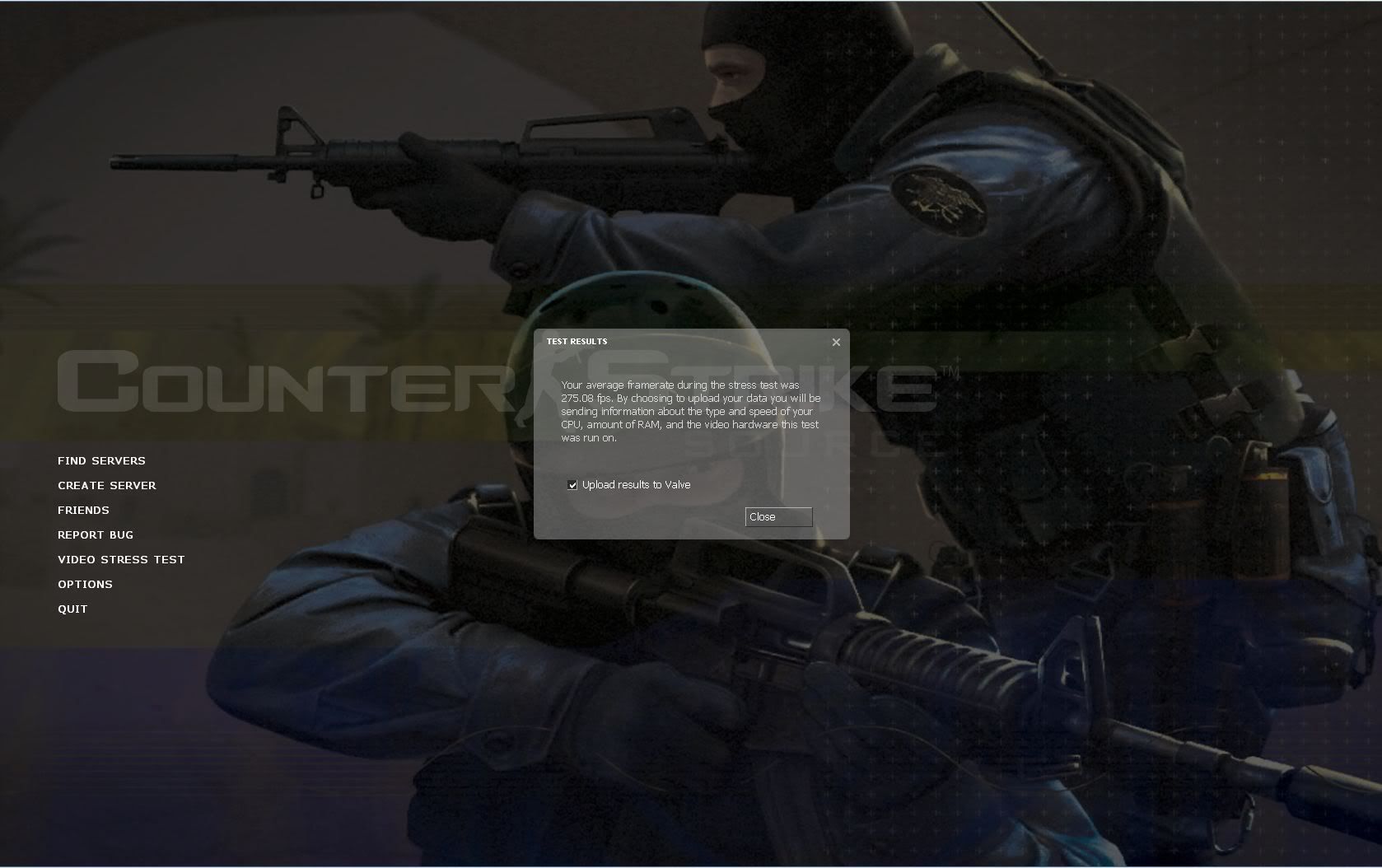
    Was able to make a huge improvement on the system1 score to 274 fps and this is what I did:
    1. Remove the 2nd GTX 295
    2. Enabled Vsync because disabling it caused instabilty during the video stress testing

    Lesson learned: Not all games can take fully advantage of multi-gpu set up and will actually hurt performance enabling it. It's a bummer since I need to test all the games that my kids are playing and see which one is suitable for multi gpu and which one is not.

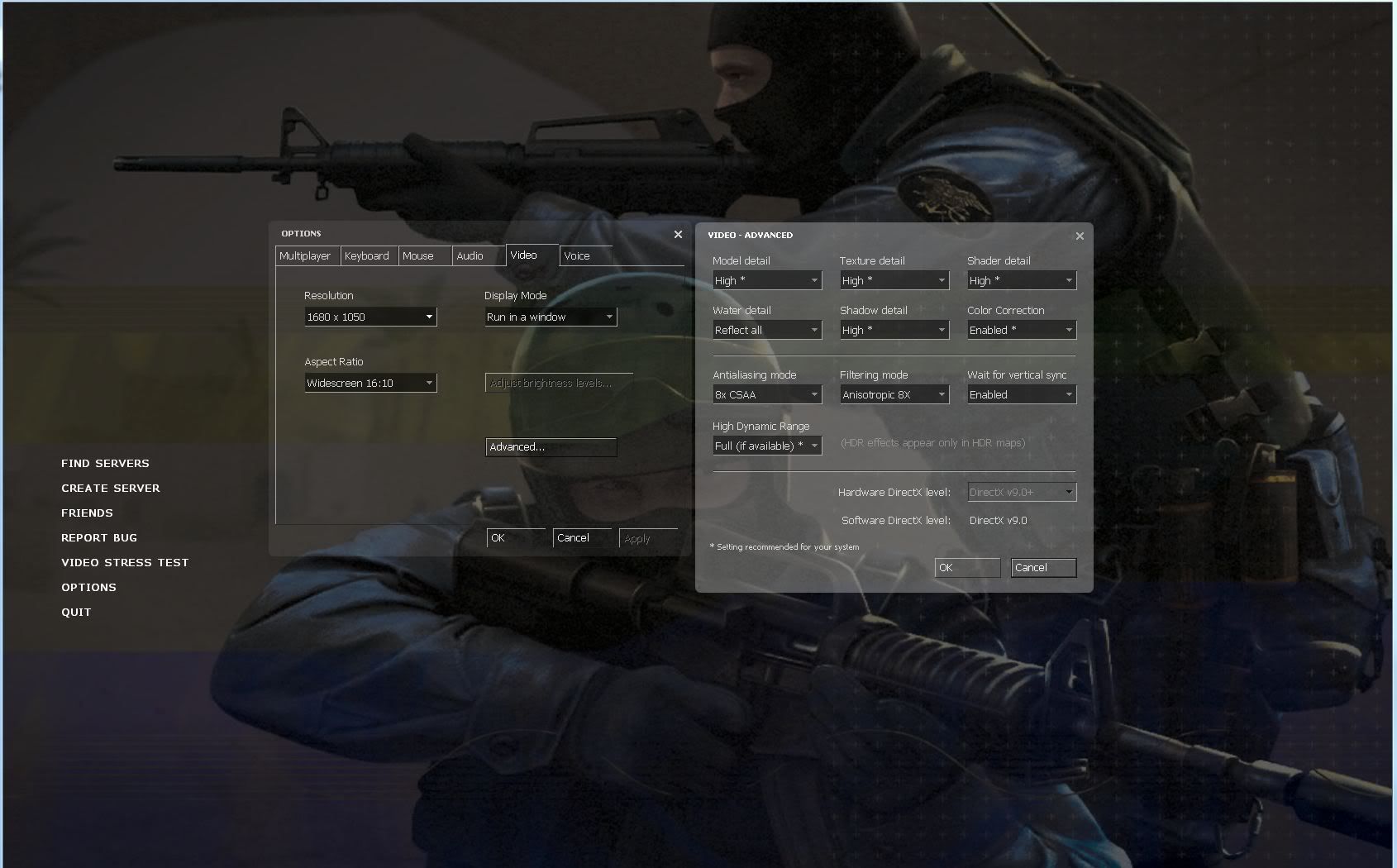
    here's the re run on the i7 system with single GTX 295 and vsync enabled

    Settings:
    Spoiler! 


    Score:
    Spoiler! 

  2. #32

    Default

    hahaha yeah it depends diay sa game if maka take advantage ba siya sa multi gpu set up
    way to go master CE nice one

  3. #33

    Default

    depende ra sa game jd :P Try Sims 3.. it doesn't support multi-gpu lol

  4. #34

    Default

    Quote Originally Posted by dmelsie View Post
    CS source engine baya gigamit, mao siguro ingana na siya ang result, daan na nga graphics engine na same ra sa half life 2 mao ingana ang result
    I dont know bro, but the most updated version of CS:Source and all updated source engines (that is, if you have an original cs source straight from steam) is that it is optimized for multicore processors since Half-Life 2: Episode 2 (February 2008 ).

    In response to the vertical sync, I dont know what's the rule of thumb of vsync. Does vsync actually limit your FPS ingame? or does it display 75fps(assuming 75hz refresh rate) but the fps counter says you have 200fps?

    In real, I have cod4 here with vsync turned on. The max refresh rate of my monitor is 75 and my FPS ingame is locked to 75. Turning off vsync makes my fps above 75, usually 90

  5. #35

    Default

    Quote Originally Posted by andz View Post
    depende ra sa game jd :P Try Sims 3.. it doesn't support multi-gpu lol
    btaw basin depende ra nah sa game oi.....

  6. #36

    Default

    wierdo lagi ang quad sli gtx295.

    hope you can fix it. yo can doh et!

  7. #37

    Default

    @ce:

    have you tried pairing the i7 with the 4890 and the phenom II with the gtx 295? hehehe, how about using only one card each?

    by the way bro, unsa nga version imo source gamit? wala man gud ang HDR nga option sa ako source karon, or mogawas lang na depende sa card?
    Last edited by insect111; 09-03-2009 at 08:18 PM.

  8. #38

    Default

    now think about this.

    correct me if im wrong..

    i7 is an incomplete part for a gaming set-up because it has no inherent SLI CAPABILITY on its x58MOBO ( ..intel vs nvidia wars ) but a third party license. via NF200 switch

    although its a very powerful processor in which no amd processor at the moment can par (in terms of sheer power and speed ), it wud difinitly lag behind the AMD-ATI DRAGON set IN GAMES.

    DRAGON was DESIGNED to be ELECTRONICALLY WORKING VERY HARMONIOUSLY and EFFICIENTLY in GAMING.

    bottom line..

    > its not i7 proc's failure. its the intel brass failure to secure ( and design ) part to complete and complement the processor.

    > nvidia's egghead

    > a gaming coup for the DRAGON TEAM.

    > good for consumer.. competition vs price > LOWER.LOWER >LOWER

  9. #39

    Default

    grabe pud oi 53 on core i7 with quad SLI shock man sad ta mag tan.aw...lupigan diay sa phenom II x4 but i think sa CS rana na game try daw sa lain na game...

  10. #40

    Default

    Quote Originally Posted by personalmgt View Post
    In response to the vertical sync, I dont know what's the rule of thumb of vsync. Does vsync actually limit your FPS ingame? or does it display 75fps(assuming 75hz refresh rate) but the fps counter says you have 200fps? In real, I have cod4 here with vsync turned on. The max refresh rate of my monitor is 75 and my FPS ingame is locked to 75. Turning off vsync makes my fps above 75, usually 90

    this is how I understand it based on my research this morning....vsync is there to eliminate tearing and will not limit the video cards abilty to render 120 frames per second however if the LCD has a refresh rate of 60 hertz it will still display all the 120 frames..well actually not all because it is skipping frames 2,4,6,8,10 and so on...


    taken from Arkalius article in [H]ard|Forum - Powered by vBulletin

    What is Tearing?
    Spoiler! 
    ]Tearing is a phenomenon that gives a disjointed image. The idea is as if you took a photograph of something, then rotated your vew maybe just 1 degree to the left and took a photograph of that, then cut the two pictures in half and taped the top half of one to the bottom half of the other. The images would be similar but there would be a notable difference in the top half from the bottom half. This is what is called tearing on a visual display. It doesn't always have to be cut right in the middle. It can be near the top or the bottom and the separation point can actually move up or down the screen, or seem to jump back and forth between two points.


    Why does Tearing happen?
    Spoiler! 
    Let's say your monitor is set to a refresh rate of 75Hz. You're playing your favorite game and you're getting 100FPS right now. That means that the mointor is updating itself 75 times per second, but the video card is updating the display 100 times per second, that's 33% faster than the mointor. So that means in the time between screen updates, the video card has drawn one frame and a third of another one. That third of the next frame will overwrite the top third of the previous frame and then get drawn on the screen. The video card then finishes the last 2 thirds of that frame, and renders the next 2 thirds of the next frame and then the screen updates again. As you can see this would cause this tearing effect as 2 out of every 3 times the screen updates, either the top third or bottom third is disjointed from the rest of the display. This won't really be noticeable if what is on the screen isn't changing much, but if you're looking around quickly or what not this effect will be very apparant.


    Double/Tripple buffering
    Spoiler! 
    Double-buffering is a technique that mitigates the tearing problem somewhat, but not entirely. Basically you have a frame buffer and a back buffer. Whenever the monitor grabs a frame to refresh with, it pulls it from the frame buffer. The video card draws new frames in the back buffer, then copies it to the frame buffer when it's done. However the copy operation still takes time, so if the monitor refreshes in the middle of the copy operation, it will still have a torn image.


    How does Vsync solve "Tearing"?
    Spoiler! 
    VSync solves this problem by creating a rule that says the back buffer can't copy to the frame buffer until right after the monitor refreshes. With a framerate higher than the refresh rate, this is fine. The back buffer is filled with a frame, the system waits, and after the refresh, the back buffer is copied to the frame buffer and a new frame is drawn in the back buffer, effectively capping your framerate at the refresh rate.


    But what if my LCD has 75 hertz and my video card only renders 50 fps?

    Spoiler! 
    Let's say you're playing the sequel to your favorite game, which has better graphics. You're at 75Hz refresh rate still, but now you're only getting 50FPS, 33% slower than the refresh rate. That means every time the monitor updates the screen, the video card draws 2/3 of the next frame. So lets track how this works. The monitor just refreshed, and frame 1 is copied into the frame buffer. 2/3 of frame 2 gets drawn in the back buffer, and the monitor refreshes again. It grabs frame 1 from the frame buffer for the first time. Now the video card finishes the last third of frame 2, but it has to wait, because it can't update until right after a refresh. The monitor refreshes, grabbing frame 1 the second time, and frame 2 is put in the frame buffer. The video card draws 2/3 of frame 3 in the back buffer, and a refresh happens, grabbing frame 2 for the first time. The last third of frame 3 is draw, and again we must wait for the refresh, and when it happens, frame 2 is grabbed for the second time, and frame 3 is copied in. We went through 4 refresh cycles but only 2 frames were drawn. At a refresh rate of 75Hz, that means we'll see 37.5FPS. That's noticeably less than 50FPS which the video card is capable of. This happens because the video card is forced to waste time after finishing a frame in the back buffer as it can't copy it out and it has nowhere else to draw frames.
    Last edited by centax error; 09-03-2009 at 09:06 PM.
Page 4 of 6 FirstFirst ... 23456 LastLast

Similar Threads

 
  1. 18W AMD Fusion Beats Intel Core i5 at Graphics Performance
    By Sempron Guy in forum Computer Hardware
    Replies: 8
    Last Post: 09-15-2010, 09:20 PM
  2. AMD (finally) sues Intel
    By Visual C# in forum Computer Hardware
    Replies: 55
    Last Post: 05-22-2010, 02:27 AM
  3. PLDT CS: SOURCE SERVER 203.131.91.200
    By irangejuice in forum Software & Games (Old)
    Replies: 923
    Last Post: 11-18-2009, 11:50 PM
  4. AMD's TRI'CORE cant beat INTEL's Dual Core
    By ninzska21 in forum Computer Hardware
    Replies: 40
    Last Post: 05-02-2008, 08:56 PM
  5. AMD Turion Vs. Intel Pentium M (Dothan) Which is better?
    By vipvip68 in forum Computer Hardware
    Replies: 6
    Last Post: 09-26-2005, 02:42 PM

Posting Permissions

  • You may not post new threads
  • You may not post replies
  • You may not post attachments
  • You may not edit your posts
  •  
about us
We are the first Cebu Online Media.

iSTORYA.NET is Cebu's Biggest, Southern Philippines' Most Active, and the Philippines' Strongest Online Community!
follow us
#top