


ive tried using datagrid inside datagrid bt somehow i cud'nt do it...
ds is wat i did inside the cell of the datagrid is another datagrid, bt its not possible i think..
is it possible?
ive tried using tables without using datagrid, somehow it works for me. dont know if its the best way...
my prob now is how will i make it expand/hide?
Results 21 to 30 of 79
Thread: VB Net Datagrid problem
-
09-13-2008, 07:36 AM #21C.I.A.


- Join Date
- Jan 2006
- Posts
- 4,139

-
09-13-2008, 10:54 PM #22Junior Member

- Join Date
- Aug 2008
- Posts
- 269
@bryanarzaga
unsaon na pagbuhat anang datagrid with a datagrid?
nindot pod na nga idea... i can use it for my thesis....
thanks daan...
-
09-14-2008, 12:15 AM #23C.I.A.
- Join Date
- Feb 2007
- Posts
- 5,708
the example above is already a working of the asp.net version of nesting a datagrid within a datagrid, Originally Posted by ingkiang

but i think what you want is a vb.net app datagrid to be nested in a datagrid, sakto ba?
i dont have .net installed pero ill try nya
-
09-14-2008, 12:39 AM #24Junior Member
- Join Date
- Aug 2008
- Posts
- 269
@bryanarzaga
ok... thanks bro.... mas nindot man gud mas daghan ta mahibaw-an..
dako na kaayo na ug tabang.....
-
09-14-2008, 12:35 PM #25C.I.A.
- Join Date
- Jan 2006
- Posts
- 4,139
yup...sak2 jud bro... Originally Posted by bryanarzaga
-
09-14-2008, 07:34 PM #26C.I.A.
- Join Date
- Feb 2007
- Posts
- 5,708
ill display the source here when im done Originally Posted by ingkiang
-
09-14-2008, 07:51 PM #27C.I.A.
- Join Date
- Jan 2006
- Posts
- 4,139
thanks bro...i reli ned it badly... Originally Posted by bryanarzaga
-
09-15-2008, 05:18 AM #28Newbie
- Join Date
- Aug 2008
- Posts
- 12
@brayan,.... Originally Posted by bryanarzaga
sa button na column if ma click...mag pa msgbox lng "na pislsit nimo ang button1"
sa combo box pag na change ang selected ...mag pa msg box lng "mao ni bagong na select + value"
sa column image pud...sakto na square size...den if taas man gud hieght sa image..ang button hieght ma stretch pud..problema
......
in anah ra bai...khibaw ka anah bai? pls tabangi tawn ko,..gusto lo lng ko makita sa implementation sa whole code...noob pa ko bai.
sample:
naa kay datagridview...den naay mga columns
Col1, Col2, Col3
Row 1 column 1 = combo box(item 1,item2,item3) -->on change display a message
Row 1 column 2 = button--->on click display a message
Row 1 column 3 = textbox -->on click of the button dispay value of textbox
Row 2 column 1 = combo box(item 1,item2,item3) -->on change display a message
Row 2 column 2 = button--->on click display a message
Row 2 column 3 = textbox -->on click of the button dispay value of textbox
....... so on and so fort
tabang mga masters...sa vb.net
-
09-15-2008, 05:43 AM #29Newbie
- Join Date
- Aug 2008
- Posts
- 12
mao ni akong code brayan...na himo bro
pag pa display pa lng..wala pa event
HTML Code:Private Sub Form1_Load(ByVal sender As System.Object, ByVal e As System.EventArgs) Handles MyBase.Load Dim dt As New DataTable Dim bs As New BindingSource Dim btnx As New Button 'btnx.Name = "btn1" 'btnx.Text = "ahahah" 'dt.Columns.Add("id", GetType(Button)) 'dt.Rows.Add(btnx) 'bs.DataSource = dt 'DataGridView2.DataSource = bs Dim column1 As New DataGridViewTextBoxColumn Dim column2 As New DataGridViewComboBoxColumn Dim column3 As New DataGridViewButtonColumn Dim column4 As New DataGridViewImageColumn With column1 .Name = "ID" .HeaderText = "Text Box" End With With column2 .Name = "Name" .HeaderText = "Combo Box" End With With column3 .Name = "but" .HeaderText = "Button" End With With column4 .Name = "image" .HeaderText = "Image" .AutoSizeMode = DataGridViewAutoSizeColumnMode.None End With DataGridView2.Columns.Add(column1) DataGridView2.Columns.Add(column2) DataGridView2.Columns.Add(column3) DataGridView2.Columns.Add(column4) Dim comboCell As DataGridViewComboBoxCell Dim btnCell As DataGridViewButtonCell Dim imgCell As DataGridViewImageCell DataGridView2.Rows.Add() DataGridView2.Item(0, 0).Value = "Row0" comboCell = DataGridView2.Item(1, 0) comboCell.Items.Add("Item1") comboCell.Items.Add("Item2") btnCell = DataGridView2.Item(2, 0) btnCell.Value = "Add to cart" 'btnCell. = 200 'btnCell.Size = New Size(200, 50) Dim bmp As New Bitmap("c:\\me.jpg") '' bmp.Height = 100 imgCell = DataGridView2.Item(3, 0) imgCell.Value = bmp imgCell.ReadOnly = False 'imgCell.Size = Size(100, 100) 'imgCell.Size.Height = 100 'imgCell() 'imgCell.Size = New Size(100, 200) DataGridView2.Rows.Add() DataGridView2.Item(0, 1).Value = "Row1" comboCell = DataGridView2.Item(1, 1) comboCell.Items.Add("Item3") comboCell.Items.Add("Item4") btnCell = DataGridView2.Item(2, 1) btnCell.Value = "sdfsadf" imgCell = DataGridView2.Item(3, 1) imgCell.Value = bmp DataGridView2.Rows.Add() DataGridView2.Item(0, 2).Value = "Row2" comboCell = DataGridView2.Item(1, 2) comboCell.Items.Add("Item5") comboCell.Items.Add("Item6") btnCell = DataGridView2.Item(2, 2) btnCell.Value = "sdfsadf" imgCell = DataGridView2.Item(3, 2) imgCell.Value = bmp End Sub
mao ni ang screenshots bai
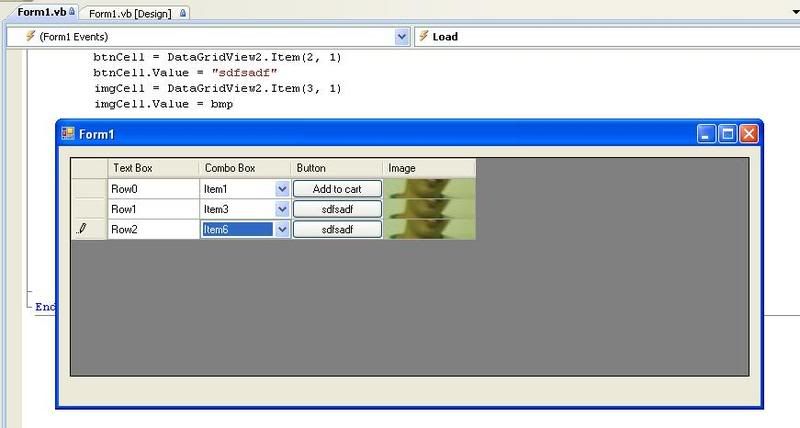
problema nako...ang size sa image..kay if akong padak-an..ang button ma stretch pud...ang akong gusto ma achieve na ma fixed ang width & hieght sa button ug sa ubang objects...din makita ang whole image sa image column. possible ba na bai?.....tabang po pls..
-
09-16-2008, 08:17 AM #30C.I.A.
- Join Date
- Feb 2007
- Posts
- 5,708
for now ako conclusion wala pako answer na ma embedd nimu ang DB grid sa VB.net wala but link to open another grid ako na gama ra, pero fully embedd under sa Vb.net wala pako sorry guys,
@pittbull dapat nimu e compensate ang imu objects ana,
pag web nalang mu oi lol, para isa ra ka lugar ang application, dri galabi nako g himu web na tanan, daun ang scheduling ra ang apps.

 Reply With Quote
Similar Threads |
|
 Posting Permissions


|