Page 3 of 5 FirstFirst 12345 LastLast
Results 21 to 30 of 41
  1. #21

    Default

    andz, diin ka ka buy tri CF bridge for your tri CF 4890? post sad results oi hehe cge ka pa thrilling dah

  2. #22

    Default

    Quote Originally Posted by centax error View Post
    andz, diin ka ka buy tri CF bridge for your tri CF 4890? post sad results oi hehe cge ka pa thrilling dah
    waaah wala koi tri cf bridge oi, 2 ra ako 4890 gihapon hehehe, ikaw tingali o

    pwede man 2 cf bridges e use.. put it on first cf slot then on the 2nd gpu put the 2nd one on the 2nd cf slot
    Last edited by andz; 07-31-2009 at 01:47 PM.

  3. #23

    Default

    Quote Originally Posted by andz View Post
    It seems many threads all over the internet has/had/have asked this same question all over.

    was tweaktown's review really truthful ? sadly.. it wasn't.

    Difference between 16x PCI-e vs 8x PCI-e in CrossFire/SLI ?

    Answer:

    Here is why.

    PCI-e 2.0 16X = 8GB/s total bandwidth
    PCI-e 2.0 8X = 4GB/s total bandwidth

    ATI:

    HD 3870 = 1125mhz (dual piped - 2.2 GB/s data rate) = 2.2 GB/s total data rate
    HD 4650 = 500mhz (dual piped - 1 GB/s data rate) = 1 GB/s total data rate
    HD 4670 = 1000mhz (single piped - 2 GB/s data rate) = 2 GB/s total data rate
    HD 4770 = 800mhz (quad piped - 3.6 GB/s data rate) = 3.6 GB/s total data rate
    HD 4830 = 900mhz = (dual piped - 1.9 GB/s data rate) = 1.9 GB/s total data rate
    HD 4850 = 993mhz (dual piped - 1.9 GB/s data rate) = 1.9 GB/s total data rate
    HD 4850 X2 = 993mhz (dual piped - 1.9 GB/s data rate)(times 2) = 3.8 GB/s total data rate
    HD 4870 = 900mhz (quad piped - 3.6 GB/s data rate) = 3.6 GB/s total data rate
    HD 4890 = 975mhz (quad piped - 3.9 GB/s data rate) = 3.9 GB/s total data rate
    HD 4870 X2 = 900mhz (quad piped - 3.6 GB/s data rate)(times 2) = 7.2 GB/s total data rate

    So as you can see, the 4870 X2 will be hurt in an 8X condition and why the 3870, 4650, 4670, 4770, 4830, 4850, 4870, 4890, and 4850 X2 will not be hurt in performance at all.

    Nvidia:

    8800 Ultra = 1080mhz (dual piped - 2.1 GB/s data rate) = 2.1 GB/s data rate
    9600 GT = 900mhz (dual piped - 1.8 GB/s data rate) = 1.8 GB/s total data rate
    9800 GTX = 1100mhz (dual piped - 2.2 GB/s data rate) = 2.2 GB/s total data rate
    GTS 250 = 1100mhz (dual piped - 2.2 GB/s data rate) = 2.2 GB/s total data rate
    GTX 260 216 = 999mhz (dual piped - 1.9 GB/s data rate) = 1.9 GB/s total data rate
    GTX 275 = 1134mhz (dual piped - 2.2 GB/s data rate) = 2.2 GB/s total data rate
    GTX 280 = 1053mhz (dual piped - 2.1 GB/s data rate) = 2.1 GB/s data rate
    GTX 285 = 1242mhz (dual piped - 2.4 GB/s data rate) = 2.4 GB/s data rate
    GTX 295 = 999mhz (dual piped - 1.9 GB/s data rate)(times 2) = 3.8 GB/s total data rate
    GTX 285X2 = 1242mhz (dual piped - 2.4 GB/s data rate)(times 2) = 4.8 GB/s data rate

    So as you can see, the GTX285 X2 will be hurt in an 8X condition and why the 8800, 9600, 9800, 250, 260, 280, 275, 285 & 295 will not be hurt in performance at all.

    Check this pic:
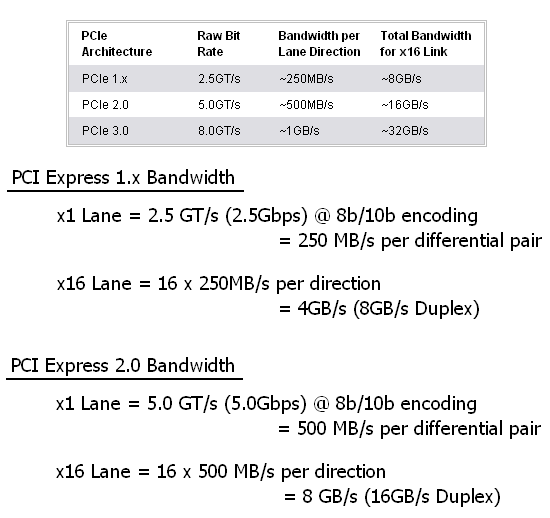

    This should be a clear message to anyone wanting to do multi-gpu setup's, people with PCI-e 2.0 @ 16x-16x-8x or 16x-8x-8x or even 8x-8x-8x bandwidth should have no bottle neck for any single gpu cards in the market, aside from the double gpu cards like 4870x2, and incoming GTX285x2.

    a quick example:

    Which is better performance in fps/gaming, 16x-8x-8x w/ PCI-e 2.0 motherboard vs 16x-16x-16x w/ PCI-e 2.0 motherboard vs 8x-8x-8x w/ PCI-e 2.0 motherboard:
    Code:
    1x 4870 1GB @ 16x slot
    1x 4870 1GB @ 8x slot
    1x 4870 1GB @ 8x slot
    vs
    1x 4870 1GB @ 16x slot
    1x 4870 1GB @ 16x slot
    1x 4870 1GB @ 16x slot
    vs
    1x 4870 1GB @ 8x slot
    1x 4870 1GB @ 8x slot
    1x 4870 1GB @ 8x slot
    Winner:
    Draw, no difference in fps. Although some 16x-16x-16x boards with n200 chipset's has fps drops in games which is reviewed many times but no drops in benchmarking (3dmarks,vantage). If your board is PCI-e 1.0 then that would be a huge difference
    All I see here is a bunch of data regarding transfer rate. No mention about resolution.

    Well saying that there is zero difference between 8x vs 16x on very high resolution on a ultra detailed settings is quite impossible.

  4. #24

    Default

    Quote Originally Posted by Kenshiro View Post
    All I see here is a bunch of data regarding transfer rate. No mention about resolution.

    Well saying that there is zero difference between 8x vs 16x on very high resolution on a ultra detailed settings is quite impossible.
    because this thread was never a topic about "resolution", you are the only user here who started to post about "resolution", this topic is about "16x vs 8x TRANSFER RATES". Which means what you posted was off-topic and was already incorrect.

    Yes there is no difference using 8x vs 16x on ultra high resolution and ultra detailed. unless you have 4870 x2 and GTX 285 x2, which you already get bottle-necked with any resolution.

    I even tested it myself, using the 2nd slot and 3rd slot of my Gigabyte X58 Extreme which has share bus ratio. 8x-8x, running crysis at 2500 x 1600 resolution on a 50" Plasma via HDMI had similar results running 16x-16x on a 2x GTX 295's.

    GPU's currently in the market can't even run 2500 x 1600 resolution properly, because its not powerful enough, not because of transfer rates. It's like comparing a 1GB video card vs 2GB video card which isn't even connected to transfer rates, yet it can give you a slight increase of 1-2 fps.

    It's like 4870 X2 vs GTX 295 why does 4870 X2 run faster then GTX 295 @ 2500 x 1600 resolution? Is it because of the "transfer rates again?" or is it something to do with Memory size? or something else.
    Last edited by andz; 07-31-2009 at 02:28 PM.

  5. #25

    Default

    Quote Originally Posted by andz View Post
    I even tested it myself, using the 2nd slot and 3rd slot of my Gigabyte X58 Extreme which has share bus ratio. 8x-8x, running crysis at 2500 x 1600 resolution on a 50" .

    How far were you seated in front of that biiig screen?
    Last edited by AdunTuridas; 07-31-2009 at 02:19 PM. Reason: si andz mn gud

  6. #26

    Default

    If your talking about transfer rates there are whole lot of differences.

    But in terms of performance there is little difference. So about transfer rates its totally useless unless performance is included in the scene. And performance usually considers resolution as a factor in measuring performance.

    What person, would only consider transfer rates without thinking about performance.

    If you can provide more reviews or links on these crossfire performance on net since there hasn't been any except for tweak town.

    Thinking about PCIe lane. So what are the things that you are gonna achieve with showing how much the transfer rates differ and the pcie electric structure. You planning to MOD a PCIE lane? Make 16x a 32X or something?

  7. #27

    Default

    Transfer Rates is about performance, but there is no performance loss on higher resolution. Is it really that hard to understand ?

    Read what i typed, add up all the GB/Data Rates. Calculate it. Math it. The pic i showed was from the anandtech review about the transfer rates.

    Why am i going to do a mod to make 16x to 32x ? is that even possible ?

    Gigabyte x58 Extreme has this:

    16x-16x-8x if only 2 GPU's are used
    16x-8x-8x if 3 GPU's are used

    I already tested 2x GTX 295's on 2nd and 3rd slot which makes them 8x each slot.. ran crysis. Ran also 2x GTX295's on 1st and 2nd slot which is 16each slot.. The results of the two are giving me the same fps and performance, is this really hard to understand?

    Crossfire reviews? there are so many lol:

    techPowerUp :: AMD Radeon HD 4890 CrossFire Review :: Page 1 / 29
    Ultimate Heavy-Weight Fight: Radeon HD 4890 CrossFireX vs. GeForce GTX 285 SLI - X-bit labs
    ATI Radeon HD 4870 X2 Vs. ATI Radeon HD 4870 CrossFire Review - X-bit labs
    http://www.overclockersclub.com/revi...ssfire_vs_sli/
    Last edited by andz; 07-31-2009 at 02:33 PM.

  8. #28

    Default

    Another bump for this very informative thread.

  9. #29

    Default

    great info..
    crossfiring 4870 x2 kailangan jud ang 790FX..

  10. #30

    Default

    Quote Originally Posted by senpai91 View Post
    great info..
    crossfiring 4870 x2 kailangan jud ang 790FX..
    not entirely true. what if you have an intel processor?

    if you have 2 pieces 4870x2 and plan to crossfire it, regardless of the platform, you're going to need two PCI-e 2.0 16x slots to avoid bottleneck.

Page 3 of 5 FirstFirst 12345 LastLast

Similar Threads

 
  1. Manny Pacquiao vs Tim Bradley Weigh in Vid w Pics.
    By Akiokee in forum Sports & Recreation
    Replies: 6
    Last Post: 06-09-2012, 09:05 PM
  2. Mayweather 146 vs Marquez 142 - Weigh in from Vegas
    By flanker in forum Sports & Recreation
    Replies: 48
    Last Post: 09-21-2009, 06:24 AM
  3. in residence outside the Philippines
    By PissKhanXXX in forum General Discussions
    Replies: 40
    Last Post: 07-03-2009, 01:43 AM
  4. DL a photo vs. DL a video in php
    By ichiriki in forum Programming
    Replies: 1
    Last Post: 10-21-2008, 10:24 PM

Posting Permissions

  • You may not post new threads
  • You may not post replies
  • You may not post attachments
  • You may not edit your posts
  •  
about us
We are the first Cebu Online Media.

iSTORYA.NET is Cebu's Biggest, Southern Philippines' Most Active, and the Philippines' Strongest Online Community!
follow us
#top