


the ports itself is independent of being safe or not, what matters is its encapsulation.Originally Posted by kryptos

if a user blindly logs-in to a remote site with plain connection without any ssl or https, then its his/her fault.
what version of pfSense?
which squid did you install? [squid or squid3]
did you configure squid as transparent proxy server? [if you are not using transparent proxy, then you have to make minor changes on your browser to point to that proxy ip/port]
the best way to see if it is cache-ing is to view its logs [nose bleed na basin]
or go to some sites like sourceforge, download something in the size of 10mb to 50mb to 100mb.
the only time you'll see if cache works is that the 2nd time you download the file, it will instantaneously save to your desktop, lets say for me for example, I have a 5mbps connection, max download rate is around 500kbps, first download/instance is the regular download speed, after I try again to download or go to some other computer to download it, the download speed will be somewhere like 9mbps or somewhere that speed [depending on your network speed and your pfSense hardware]
Results 111 to 120 of 251
-
09-18-2015, 02:53 PM #111Elite Member


- Join Date
- Aug 2009
- Posts
- 1,477

-
09-18-2015, 06:16 PM #112Senior Member
- Join Date
- Nov 2004
- Posts
- 633
Hi Sir! Originally Posted by dab_s_bad
Here's my answers. hehe Salamat sa reply sir ha!
what version of pfSense? Version 2.2.4
which squid did you install? [squid or squid3] squid
did you configure squid as transparent proxy server? [if you are not using transparent proxy, then you have to make minor changes on your browser to point to that proxy ip/port] Yes! Using transparent proxy
the best way to see if it is cache-ing is to view its logs [nose bleed na basin] Nosebleed jud ko ani Sir. Asa makita ang logs?
or go to some sites like sourceforge, download something in the size of 10mb to 50mb to 100mb. Normal download lang ang gamiton ani like sa browser lang or using 3rd party software like IDM?
the only time you'll see if cache works is that the 2nd time you download the file, it will instantaneously save to your desktop, lets say for me for example, I have a 5mbps connection, max download rate is around 500kbps, first download/instance is the regular download speed, after I try again to download or go to some other computer to download it, the download speed will be somewhere like 9mbps or somewhere that speed [depending on your network speed and your pfSense hardware] - Mao ni akong kalibgan sir kung unsaon naku pag identify nga ni kusog cya or ni hinay or sa Internet gihapon cya ni DL or sa Cache Server ba
Hardware Specs:
Processor: Core i3 @ 3.2Ghz
Memory: 4GB
HDD: 500GB
Network Speed: Gigabit
Internet Bandwidth: 8mbps (iGate - Fiber)
Local Network: (Switch cascading - Fiber)
-
09-19-2015, 06:15 AM #113Elite Member
- Join Date
- Aug 2009
- Posts
- 1,477
ok ra bisan unsa in terms sa download, normal browser/plugin or even IDM, ok ra, ayaw lang torrent

wala na nako ma-install ang squid kay via usb na ako pfSense == dili ka-ayo ko katabang , adto sa pfSense forums patabang ^_^
ang squid log kay na-a man siguro sa /var/log/.... (kalimot ko exact location)
imo bantayan kay ang 'hit' or 'miss' sa logs
-
09-19-2015, 11:20 AM #114Junior Member
- Join Date
- Jan 2011
- Posts
- 279
working on squid3 custom refresh pattern syntax dili mu cache sa mga game updates useless ang pgcache sa normal download sa mga files mas nindot kung mu cache ni sia sa youtube ug game updates.
-
09-20-2015, 06:44 AM #115Senior Member
- Join Date
- Nov 2004
- Posts
- 633
Bro, salamat sa imong replies. Naka testing na jud ko.. And it was properly working. hehe.. Originally Posted by dab_s_bad
Karun ang Traffic Shaper nasad akong kalingawan. Sa Traffic Shaper kay wala jud ko nasabtan.. hehe..
-
09-20-2015, 04:44 PM #116Elite Member
- Join Date
- Aug 2009
- Posts
- 1,477
for game updates, mu-work siya sa uban. Originally Posted by makasapot
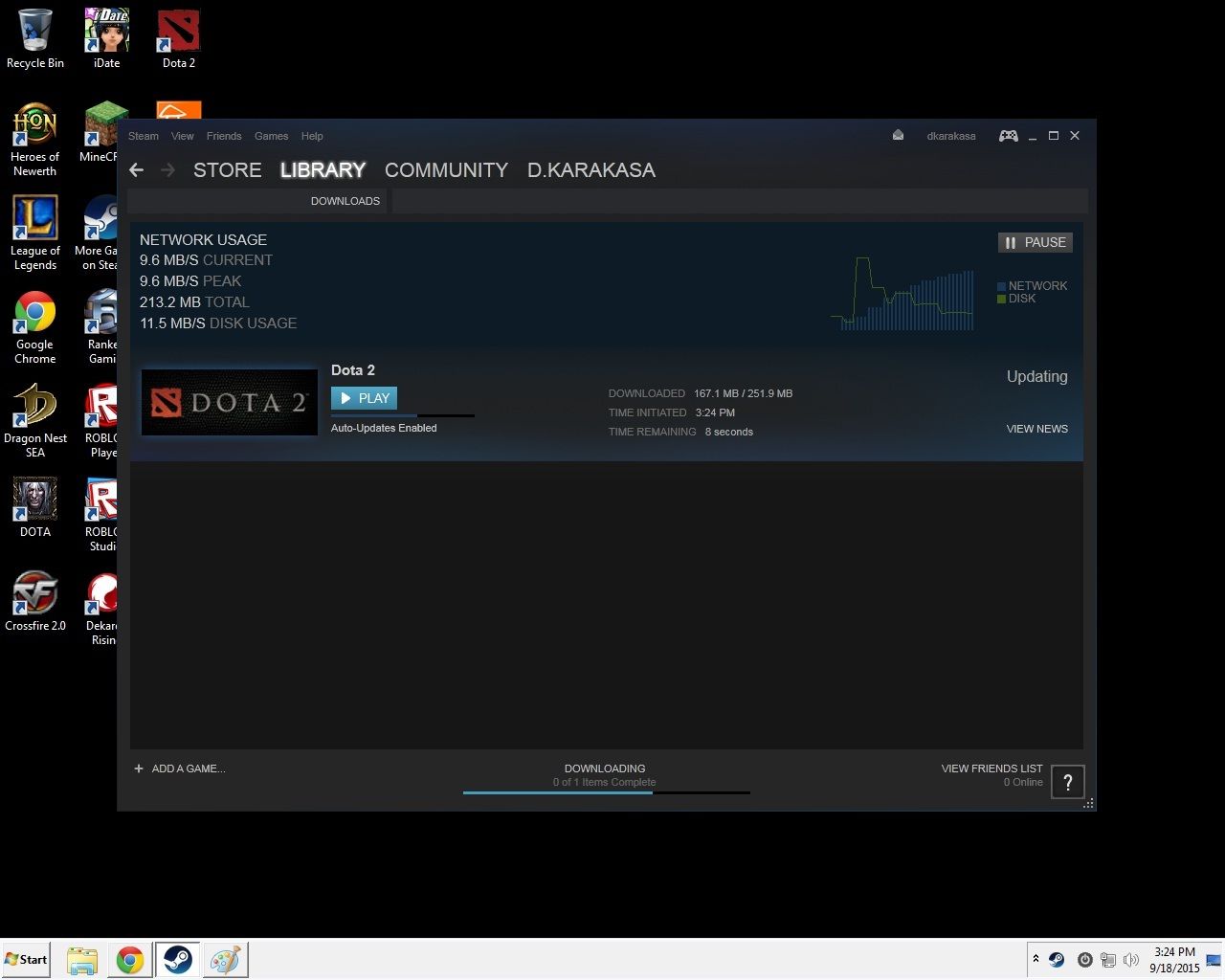
anyways, since sikat man ka-ayo dota2 then grabe ka-dagko sa ila patch/game updates, ming try nako sa LANCache, nice ka-ayo result ^_^, tan-awa ang download speed ani!!!, ako internet kay 5mbps then max download kay around 500kbps, pero..., tan-awa ang download speed..., abot 9mbps! , 9.6mbps rani kay 100mb lan speed raman ang netbook ako gi-test, what more kung 1gb ang lan, abot gyud basin around 60mbps basin
maglunop/malumos ka una ana traffic shapping bro Originally Posted by huryhoy
, basin mag-uban rata sa pfSense forums.
-
09-20-2015, 05:42 PM #117Junior Member
- Join Date
- Jan 2011
- Posts
- 279
beh ambi inyo email be gaan ta mu sa aku firewall rule ug traffic shaping then ingna ku sa unsa kulng ug problema ky kadiyot ra nku ni nku ge test jud peo nindot iya output peo kung naa patch mu lag jud ang duwa aku na gelaen ug queue ang crossfire ug dota 2 kay mao mana sila ang mga duwa permi naa update karon atleast dili ma damay ang kada duwa if ever naa mgpatch or update. Originally Posted by dab_s_bad
-
09-20-2015, 05:52 PM #118Elite Member
- Join Date
- Aug 2009
- Posts
- 1,477
use gmail or use dropbox or similar... Originally Posted by makasapot
-
09-20-2015, 06:00 PM #119Junior Member
- Join Date
- Jan 2011
- Posts
- 279
dili ku kamao ana lage. ignoy ku ana Originally Posted by dab_s_bad
-
09-20-2015, 06:19 PM #120Junior Member
- Join Date
- Jan 2011
- Posts
- 279

 Reply With Quote
Similar Threads |
|
 Posting Permissions


|