
Katong wala pa na Unlock ilang Modem mao ni gamita!Download Link:
dc-unlocker_client-1.00.0890.exeInstruction for Install1.double click2.Click "Install"3.Wait to finished4.Click "Close"5.Go to you Desktop then click DC-Unlocker ClientHow to Use?Ubos sa "Select manufacturer" e click ang down arrow, pangita onsa ang brand sa modem ninyo.human ana "Select model" ninyo "Auto detected(recommended)" only.Sa right side makakita mo "Server" Click na ninyo. Naay "Login Options" diha Type your Username and Password.then Click ninyo kanang Picture na gamay na Magnifying glass cya na mo read sa modem ninyo huwata lng gamay kay ge basa pa niyaHuman na niya na read!sa ubos ana "SIM Lock Status: Lock" nka butang meaning wla pa na unlock ang modem ninyo,sa Right side nakitan ninyo "Unlocking" click na ninyo, human sa ubos naay "Unlock"Click "Unlock"Naa mo makitan "Unlocking was Succesfull" ok na unlock na modem ninyoENJOY

Note: If you want Username and password in Dc-unlocker just PM me.
NEW UPDATE:DC-UNLOCKER v1.00.0565 CRACKED!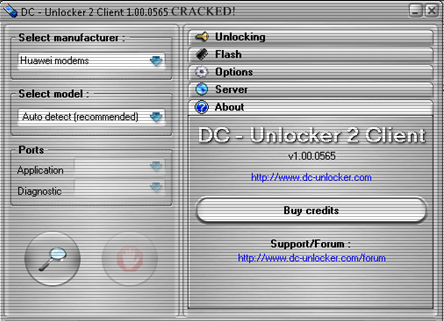
DC-unlocker client software V1.00.0565DOWNLOAD HERE!
DC-Unlocker v1.00.0565.rarAdded:Modems:Huawei E153HUAWEI Emobile D23HWZTE MF100 VIETTEL customised BD_VNVIEP671A1V1.0.1B01Sierra Wireles USB 309Router:Huawei B560Phones:ZTE F101ZTE F870ZTE T930Chipset detection addedInstructions:* Extract the content of the .RAR file* Once you extracted all the required files, run "dccrap.exe"* Disconnect to the internet and plug your USB Modem with a different provider SIM. (for Huawei users, you dont need to swap any SIM). And insert your modem to the USB port.* Choose what "manufacturer" that your modem is. (Huawei Datacards or ZTE Datacards... choose that matches on your Modem.)* Click the magnifying glass, and it will search for plugged USB modems.* Once the modem is detected, go to login page, type whatever you want. It's just a lame login system.* Click Unlocking menu, then choose "unlock".* Wait till the unlocker program says that, unlock is successfully done.* Voila, enjoy your unlocked Modem.Works on ZTE USB modems. Dunno on some Huawei modems (specially the redbox)Tried and tested with my ZTE modem.The unlocking process, was done only in less than 2 minutes, compare to the flashing that will take around 20minutes to unlock and higher risk of bricking it.*Notes:- try running the program with administrator's privilege- make sure that youre disconnected to the internet, and your dashboard is not running.- Longcheer WM66 Modem/WM66A - ZTE MF626 (All FW Versions)- ZTE MF627 - HUAWEI Modems E1552, E1553Edited:
gamita ni ninyo dapat Connected mo sa INTERNET , pwede sad mo ad2 sa internet cafe pra magunlock sa inyong modem, Dli man maunlock kung wlay Internet



 Re: FREE: DC-UNLOCKER 2 Client 1.00.0890/Unlock ALL MODEM
 Originally Posted by JovSkie







 Reply With Quote
 Posting Permissions

