


istoryans,
greetings!
naa ko problem bahin sa internet connection.. unsay device or naa ba software nga mo distribute sa connection nga equal sa mga pc kung naay mga video streaming or ushay naa mag download? kay naa man mag duwa ug online games kay mo lag ang ga duwa. mag sige reklamo kay lag kono. mao naka huna2 ko ug consult sa mga genius diri.. hehehe.. gai nlng sd ko advice kabahin ani unsa mga possible remedy ani nga problem.. hehehe..
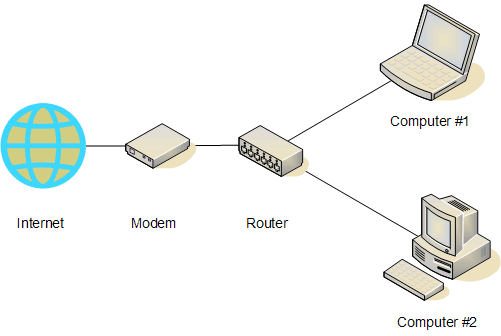
murag ing ani set up
3 ka pc..wako ko lain makit an pic.. hehehe pa cnsya na..
thank you...
Results 1 to 8 of 8
Thread: naa ko pangutana
-
03-01-2012, 10:40 AM #1Senior Member


- Join Date
- Nov 2011
- Posts
- 875
 naa ko pangutana
Last edited by misterbot; 03-01-2012 at 10:54 AM. Reason: add info
-
03-01-2012, 11:06 AM #2Elite Member Premium Member

- Join Date
- Nov 2003
- Posts
- 924
Re: naa ko pangutana
bro, check this out: Bandwidth Manager for Windows - Bandwidth Controller
-
03-01-2012, 11:08 AM #3Elite Member

- Join Date
- Nov 2011
- Posts
- 1,840
Re: naa ko pangutana
im not an expert on this subject matter, but i do know na common jud ni siya na problem. i suggest that you subscribe to a faster connection from your ISP. so that if naay magdownload, naa japon enough speed ang nag-online game..
im not sure if this can work as "isolation" method, just try lang.
try to designate your PC units, naay para internet use, and naa para LAN gaming.
here's how:
> go to Network Connections
> Local Area Connection
> on the General tab, select Properties
> scroll down to Internet Protocol (TCP/IP)
> select Properties
> on the General tab, modify the LAST DIGIT ONLY of the Default gateway
> you may set it as: (X is equivalent to a number value)
XX.XX.XX.1 for the internet use
XX.XX.XX.2 for the LAN Gaming
also, for faster internet connection for general use, try this:
> go to Device Manager
> expand Ports (COM & PLT)
> double click Communications Port (COMX)
> select Port Settings tab
> change Bits per second to 128000 <-- this is the max value
> change te Flow control to Hardware
> click OK
> restart PC
-
03-01-2012, 11:12 AM #4Elite Member
- Join Date
- Nov 2011
- Posts
- 1,840
Re: naa ko pangutana
kani TS. swak kaayo ni sa imong gipangita.. Originally Posted by dark_humbz

-
03-01-2012, 11:13 AM #5 Re: naa ko pangutana
its all in the router. kung gusto ka ug same speed tanan gamit ka ug UTP. but if naa mo gamit ug wifi mga 50% ra compare sa UTP ang ma absorb nga connection.
much better if e move ni sa networking and internet section.
-
03-01-2012, 11:35 AM #6Senior Member
- Join Date
- Nov 2011
- Posts
- 875
Re: naa ko pangutana
sir trial version ni cya?waka idea mga full version ma download? Originally Posted by dark_humbz
galibog sd ko asa ni botang sir.. hehehe Originally Posted by eXpLoDe
bali gi configure lang ni ang sa network sir? Originally Posted by shryock
thank you sir sa advice... dark_humbz, eXpLoDe, shryock
-
03-01-2012, 11:44 AM #7 Re: naa ko pangutana
use router with QOS on upload and download...
btw, sa networking section ni na topic...
-
03-01-2012, 12:07 PM #8Senior Member
- Join Date
- Nov 2011
- Posts
- 875
Re: naa ko pangutana
palihug ko transfer..ty

 Reply With Quote

Similar Threads |
|
 Posting Permissions


|