


kani nga firmware ako i-install?
Download Library | ZyXEL
unsaun pag-update sa firmware sir?
Results 8,531 to 8,540 of 15099
Thread: PLDT MyDSL DISCUSSIONS
-
09-02-2011, 02:15 PM #8531Elite Member


- Join Date
- Apr 2008
- Posts
- 1,367
 Re: PLDT MyDSL DISCUSSIONS
-
09-02-2011, 02:37 PM #8532C.I.A.

- Join Date
- Jan 2007
- Posts
- 2,519
Re: PLDT MyDSL DISCUSSIONS
click on Maintenance > Tools

nya click on Upload, then browse for your downloaded Firmware file. usually .bin na siya...
-
09-02-2011, 02:40 PM #8533Elite Member
- Join Date
- Apr 2008
- Posts
- 1,367
Re: PLDT MyDSL DISCUSSIONS
if ang ip address nako ba kai katong 192.168.1.2 Originally Posted by zhrike

then browse to 192.168.1.1
automatic ra man to log-in, provided na ang password. walai username.
then sa page,
status ra lagi sa modem ako makita..
unsaun pag-access ana sir?
-
09-02-2011, 02:44 PM #8534C.I.A.
- Join Date
- Jan 2007
- Posts
- 2,519
Re: PLDT MyDSL DISCUSSIONS
if ingon-ana bro then you're logged in as User, dili ka logged in as Admin.
e-clear ang na save nga password bro, then use the username adminpldt with password 1234567890 para maka login ka as Admin
User privileges can only view the modem's status.
Admin privileges can view modem status and edit modem settings.
-
09-02-2011, 03:03 PM #8535Elite Member
- Join Date
- Apr 2008
- Posts
- 1,367
Re: PLDT MyDSL DISCUSSIONS
sir, mao ra jud ni mugawas: Originally Posted by zhrike
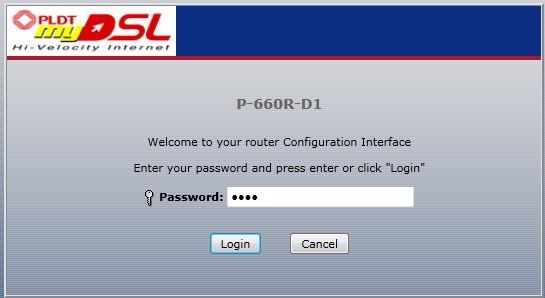
unsaun pagclear sa username and pasword?
-
09-02-2011, 03:04 PM #8536C.I.A.
- Join Date
- Jan 2007
- Posts
- 2,519
Re: PLDT MyDSL DISCUSSIONS
ay kana bro dili na ma clear kay sa modem nana nga script hehehe... try putting 1234 or 1234567890 as password bro...
-
09-02-2011, 03:21 PM #8537Elite Member
- Join Date
- Apr 2008
- Posts
- 1,367
Re: PLDT MyDSL DISCUSSIONS
sir ako gibuhat para maka-access ko sa admin page sa p600: Originally Posted by zhrike
1. change ip address to 192.168.1.2> press tab(automatic nafill-up ang subnet mask)>OK
2. gi-enable nako ang telnet client. Start> Control Panel > Programs And Features> Turn Windows features on or off >Check Telnet Client> OK
3. change admin password. start >run>cmd
command: telnet 192.168.1.1
muprompt ug password: 1234
then command: sys adminPassword 112233
saved!
exit.
4. browse 192.168.1.1. enter password: 112233. voila!
 nakalock diay ako modem.
-
09-02-2011, 03:23 PM #8538Elite Member
- Join Date
- Apr 2008
- Posts
- 1,367
Re: PLDT MyDSL DISCUSSIONS
verify lang nako sir,
P-660R-D13.40(AGE.5)C0May 27, 2011 << i-update nko ang firmware to this?
-
09-02-2011, 03:40 PM #8539Elite Member
- Join Date
- Apr 2008
- Posts
- 1,367
Re: PLDT MyDSL DISCUSSIONS
updated the firmware already..
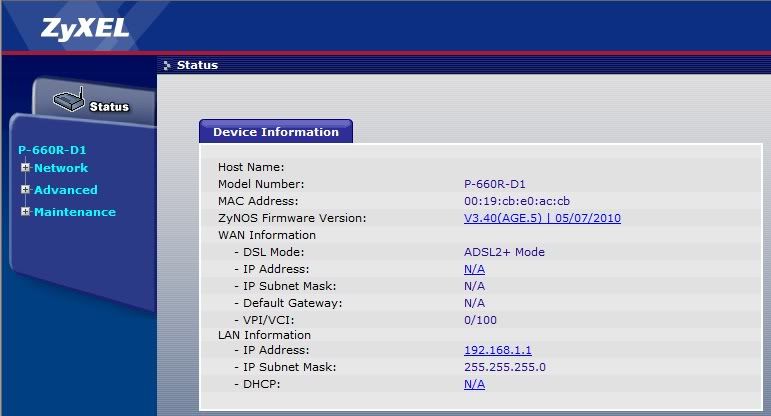
still no improvements

-
09-02-2011, 04:03 PM #8540Senior Member

- Join Date
- Dec 2010
- Posts
- 789
Re: PLDT MyDSL DISCUSSIONS


my speed

 Reply With Quote
Similar Threads |
|
 Posting Permissions


|